KeplerDocsUnderstand your files without opening them
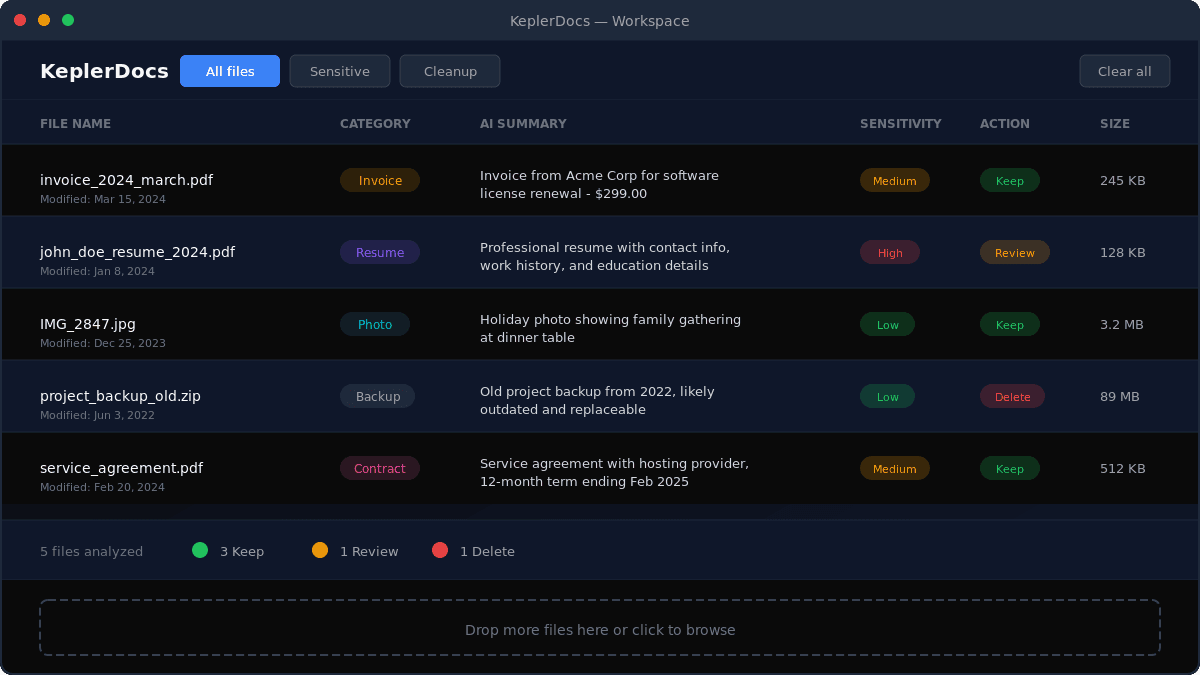
KeplerDocs uses artificial intelligence to analyze your documents, detect sensitive information, and recommend what to keep or delete. Stop wasting time opening files one by one.
How KeplerDocs Works
Get actionable insights about your files in three simple steps
Drop your files
Drag and drop files into KeplerDocs or use the file browser. We support PDFs, images, documents, text files, and more. Your files never leave your device.
KeplerDocs analyzes metadata
File names, sizes, types, and dates are examined. For text files, a small preview is read. This information is used to understand what each file contains.
Get smart recommendations
Receive clear summaries, sensitivity ratings, and keep/delete recommendations for each file. Export results to CSV for your records or further analysis.
Powerful Features for File Organization
Everything you need to understand and organize your digital files
Instant File Summaries
Get clear, human-readable descriptions of what each document contains. Understand contracts, invoices, reports, and more without opening them.
Sensitive Data Detection
Automatically identify files containing personal information, financial data, passwords, or other sensitive content. Know which files need extra protection.
Smart Cleanup Suggestions
Find files you can safely delete — duplicates, outdated documents, temporary files, and clutter. Free up storage space with confidence.
Automatic Categorization
Files are automatically sorted into categories: invoices, contracts, resumes, photos, code, configurations, and more. Find what you need faster.
Export to CSV
Download your analysis results as a CSV file. Perfect for record-keeping, sharing with colleagues, or importing into spreadsheets for further analysis.
Session Persistence
Your analysis results are saved locally for 24 hours. Close your browser, come back later, and pick up right where you left off. No account required.
Perfect For
KeplerDocs helps anyone who deals with lots of digital files
Professionals
Quickly audit client documents, contracts, and project files without opening each one.
Home Users
Organize years of accumulated downloads, photos, and documents. Find what to keep and what to delete.
Students
Sort through research papers, notes, and assignments. Know what's important before exams.
Developers
Identify config files, documentation, and code across projects. Spot sensitive credentials quickly.
Frequently Asked Questions
Everything you need to know about KeplerDocs
Join the early list
Be the first to know when we launch new features and paid plans. Early supporters get special perks.
About the name
KeplerDocs is named in homage to Johannes Kepler's approach of discovering clean, reliable structure in messy observations. We are not affiliated with any Kepler organizations — just inspired by the pursuit of turning chaotic data into usable, trustworthy information.